
Meet ClickFix, the social engineering attack that’s become the cybercriminal’s golden ticket in 2025. Microsoft’s latest report drops a bombshell: 47% of all attacks started with this thing. And just when you thought it couldn’t get more sophisticated, we spotted a new variant that’s basically a masterclass in psychological manipulation. Let me tell you about it.
Video Tutorials, Timers, and OS Detection
So here’s what the fresh version brings to the table. The latest ClickFix page is wrapped in a fake Cloudflare CAPTCHA—and I mean it looks legit. Users see Cloudflare CAPTCHAs all the time, so they’re ready to follow instructions without a second thought. But this one’s different.
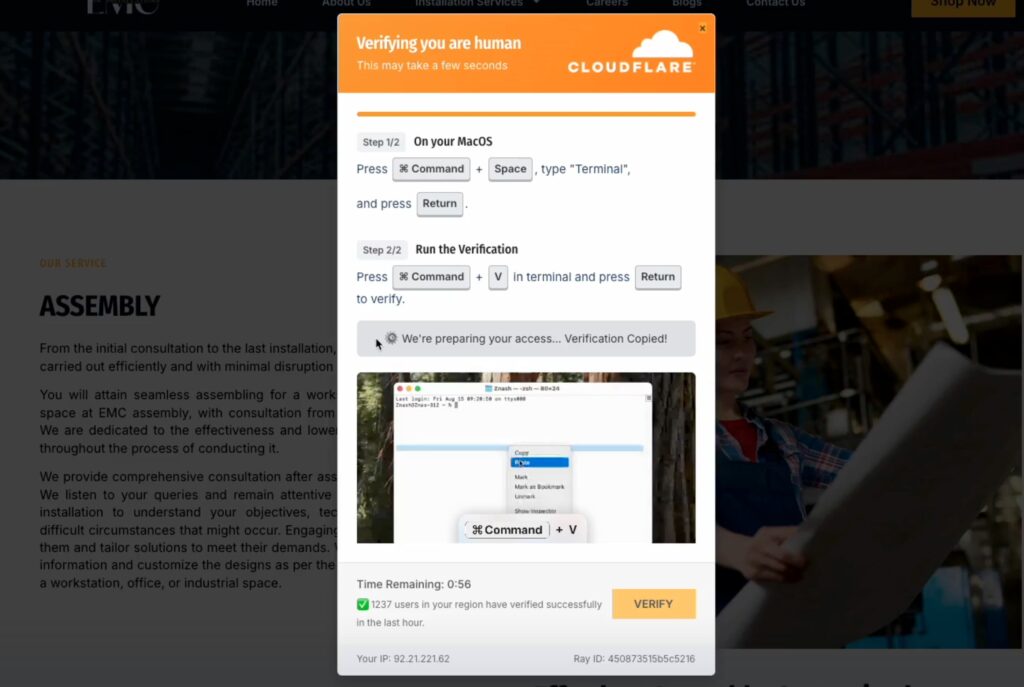
First, there’s an embedded video tutorial showing you exactly how to complete the “verification.” Step by step, no ambiguity. Then there’s a countdown timer creating that sense of urgency. But here’s the kicker—my respect to whoever came up with this: a live counter showing “1,237 users verified in the last hour.”
Think about that for a second. You see that number ticking up, and your brain goes: “Well, if 1,237 people managed to do this in a minute, why am I worse?” It’s pure psychological manipulation, and it works beautifully.
The page also detects your operating system automatically. Mac? You get Mac-specific instructions. Windows? Windows instructions. Linux? You guessed it. Everything’s tailored to make you feel like this is a legitimate, professional service that knows what it’s doing. Oh, and in 9 out of 10 cases, the malicious code gets automatically copied to your clipboard via JavaScript. Convenient, right?
Delivery Methods
Here’s where it gets interesting. The delivery vectors aren’t standing still either. The top method? Google Search. 80% of observed ClickFix attacks come through poisoned search results and malvertising. Attackers either hijack legitimate sites (there’s always a steady supply of CMS vulnerabilities) or they vibe-code their own sites and optimize them for search terms.
This completely bypasses email security controls—you know, that traditional first line of defense that everyone relies on. When ClickFix does come via email, it uses domain rotation, bot protection, and heavy obfuscation to stay ahead of detection. But the real kicker is that because the malicious code gets copied inside the browser sandbox, traditional security tools can’t see it happening. The code only becomes visible when you paste it into your terminal—and by then, well, you know how that story ends. These PowerShell commands are often heavily obfuscated to avoid detection, making them even harder to spot before execution.
Payloads
When it comes to the malicious payload, there’s plenty of creativity happening. While mshta and PowerShell are still the bread and butter, attackers are abusing a whole range of legitimate tools across different operating systems. Common payloads include Lumma Stealer, AsyncRAT, DarkGate, and various other info stealers. The thing is, you can’t just disable every legitimate service users interact with—that’s the attacker’s whole advantage.
There’s this technique researchers call “cache smuggling” that’s particularly clever. It combines ClickFix with JavaScript that caches a malicious file disguised as a JPG. The ClickFix command executes locally, delivering an entire zip file to your system without PowerShell needing to make any web requests. Network-based detection? Completely evaded.
And looking ahead, researchers are already speculating about a future where ClickFix could operate entirely in the browser, completely bypassing EDR systems. Right now the attack path is: browser → endpoint → browser credentials. But what if they could skip the endpoint entirely? That’s a scary thought.
Why It Works?
Here’s the thing: for over a decade, security awareness training hammered three points into people’s heads. Don’t click suspicious links. Don’t download risky files. Don’t enter passwords on random websites. But nobody ever told users to be suspicious of opening a terminal and running a command they copied from a website. That’s not in the training manual.
So when users see a Cloudflare CAPTCHA (which they encounter regularly), a video tutorial, a countdown timer, and a counter showing thousands of people already verified—they think: “This looks legitimate, I’ll just follow the instructions.” And honestly, can you blame them?
The attack is so successful that it’s inevitably making its way into the arsenal of threat actors who are a cut above your average script kiddie. We’re talking organized cybercrime groups that can afford to hire developers from darknet forums. This isn’t a niche tool anymore—it’s mainstream.
The Single Point of Failure Gamble
Here’s the uncomfortable reality: for most organizations, EDR-based interception is the last—and only—real line of defense. That’s a single point of failure, and here’s why that’s dangerous.
EDR bypass techniques keep evolving. It’s a constant cat-and-mouse game. User-initiated attacks often lack context, so alerts get misclassified. BYOD devices? Half the time they don’t even have EDR coverage. And if EDR doesn’t catch it, nothing does. The attack succeeds, and you’re left wondering what went wrong.
Organizations are essentially gambling everything on one control. If it fails, the whole security posture collapses. That’s not a strategy—that’s hoping for the best.
So, defense strategies. You need multiple layers, because relying on one is suicide. Browser-based detection that monitors copy-paste operations. Comprehensive EDR coverage across all devices (including those BYOD nightmares). User education—though good luck with that one. Network monitoring for unusual patterns. Application control to restrict what can execute scripts.
Some solutions are starting to detect malicious copy-paste operations directly in the browser, which gives you an earlier detection point than waiting for EDR to catch execution. Unlike those heavy-handed DLP solutions that block everything and make everyone hate you, these can spot suspicious patterns without turning your employees into productivity zombies.

The Bottom Line
So there you have it. ClickFix is 2025’s biggest hit, and it’s not going anywhere. The attack is extremely successful, which means it’s inevitably making its way into the arsenals of threat actors who are a step above your average darknet forum script kiddie. These are organized groups that can afford to hire developers, and they’re adopting ClickFix because it works.
Researchers warn users not to execute commands if they don’t fully understand what they’re doing. That’s bold of them to assume the average user fully understands anything at all. Most users see a Cloudflare CAPTCHA they recognize, a video tutorial, a timer, and a counter showing thousands of successful verifications—and they follow the instructions. Can you really blame them?
The real solution isn’t just user education (though that helps). It’s building security controls that assume users will make mistakes and catch attacks before they succeed. Because let’s face it—users will make mistakes. They always have, and they always will. The question is: are your defenses ready to catch them?