
SolaraV3.exe Trojan Wacatac Analysis
Technical Analysis
| File Name | SolaraV3.exe |
| File Type |
PE32+ executable (GUI) x86-64, for MS Windows
|
| Scanner Version | 1.0.254.174 |
| Database Version | 2026-09-21 16:01:28 UTC |
Trojan.Win64.Wacatac.sa
Malware family: Wacatac
Scan Another File
File Identification
| Hash Type | Value | Action |
|---|---|---|
| MD5 |
084ba607d5cf148e3d0a85a028bab4ba
|
|
| SHA1 |
21a966098c142a1ae269b5ff585c708d890d0f04
|
|
| SHA256 |
4f0effff09207036720527d8d17fc0c3c630729f2acb6d510fdbe213fc48515d
|
|
| SHA512 |
41ce0d0a5c86d8eab16918f685d122f915529a8f74751c27ee1aeef34720de0091220066043d27cba1bb61bfeaaf9588a048b205be3c6a87107eec371a0faef9
|
|
| ImpHash |
c3149f53ee9d86d4bf603a1740e3a3c0
|
PE Analysis
Basic Information
▼| Icon |
Hash: bf2d7ecdbf16ec9262f7f316545b7f89
Fuzzy: 64a022e97c41adc2ae065a859dcc8469 dHash: 966954b2b2cc6996 |
| Image Base | 0x140000000 |
| Entry Point | 0x140c74b90 |
| Compilation Time | 2026-09-16 02:18:19 |
| Checksum | 0x012d89e7 (Actual: 0x012d89e7) |
| OS Version | 6.0 |
| PEiD Signatures |
PE32+ executable (GUI) x86-64, for MS Windows
|
| PDB Path | SolaraV3.pdb |
| Digital Signature | OK |
| Imports | 25 libraries |
| Exports | 0 functions |
| Resources | 12 Resources |
| Sections | 6 Sections |
Version Information
▼| CompanyName | CMD Softworks |
| FileDescription | Solara V3 |
| FileVersion | 0.1.0 |
| ProductName | Solara V3 |
| ProductVersion | 0.1.0 |
| Translation | 0x0000 0x04b0 |
PE Sections
▼| Name | Virtual Address | Virtual Size | Raw Size | Entropy | Characteristics | MD5 |
|---|---|---|---|---|---|---|
.text |
0x00001000 |
13,258,128 bytes | 13,258,240 bytes | 6.19 (Normal) |
IMAGE_SCN_CNT_CODE|IMAGE_SCN_MEM_EXECUTE|IMAGE_SCN_MEM_READ
|
E6C20467D496FE1420F8AEF13CF8C1CC |
.rdata |
0x00ca6000 |
5,591,952 bytes | 5,592,064 bytes | 6.13 (Normal) |
IMAGE_SCN_CNT_INITIALIZED_DATA|IMAGE_SCN_MEM_READ
|
959AF2B15FD831D260F4B02124E09454 |
.data |
0x011fc000 |
21,896 bytes | 12,288 bytes | 2.39 (Normal) |
IMAGE_SCN_CNT_INITIALIZED_DATA|IMAGE_SCN_MEM_READ|IMAGE_SCN_MEM_WRITE
|
9A1FF68733A108B9D9ADD341F9F97E8D |
.pdata |
0x01202000 |
727,104 bytes | 727,552 bytes | 6.76 (Compressed) |
IMAGE_SCN_CNT_INITIALIZED_DATA|IMAGE_SCN_MEM_READ
|
5F70F8A193F24993D021565414A87528 |
.rsrc |
0x012b4000 |
76,672 bytes | 76,800 bytes | 7.97 (Packed/Encrypted) |
IMAGE_SCN_CNT_INITIALIZED_DATA|IMAGE_SCN_MEM_READ
|
1CF29C14A6B1D872B25D33AED5B11900 |
.reloc |
0x012c7000 |
59,452 bytes | 59,904 bytes | 5.47 (Normal) |
IMAGE_SCN_CNT_INITIALIZED_DATA|IMAGE_SCN_MEM_DISCARDABLE|IMAGE_SCN_MEM_READ
|
7D57AE1360503A0C4B1B28042B2CEB7B |
Entropy Analysis Alert
1 section(s) with high entropy (≥7.5) detected - possible packing/encryption
1 section(s) with elevated entropy (≥6.5) - possible compression
Resource Analysis
▼| Resource Type | Count | Total Size | Percentage |
|---|---|---|---|
| RT_ICON | 9 | 74,997 bytes | |
| RT_GROUP_ICON | 1 | 132 bytes | |
| RT_VERSION | 1 | 484 bytes | |
| RT_MANIFEST | 1 | 334 bytes |
Certificate Chain Analysis
▼No Digital Signatures
This file is not digitally signed.
Security Implications:
- Cannot verify the publisher's identity
- Increased security risk when running this file
- May trigger security warnings on some systems
⚠ This file either lacks a digital signature or the certificate chain could not be verified
Exercise caution when executing unsigned files from unknown sources
Certificate Verification Status
OK
Trojan.Win64.Wacatac.sa Removal
Gridinsoft has the capability to identify and eliminate Trojan.Win64.Wacatac.sa without requiring further user intervention.
Download Anti-MalwareRemoval Instructions
Follow these steps to completely remove the threat from your system
-
1
Get Gridinsoft Anti-Malware — it's a quick 2 MB download that won't slow down your PC.
-
2
Run the installer gsam-en-install.exe. The setup takes about 2 minutes and doesn't require a restart.
-
3
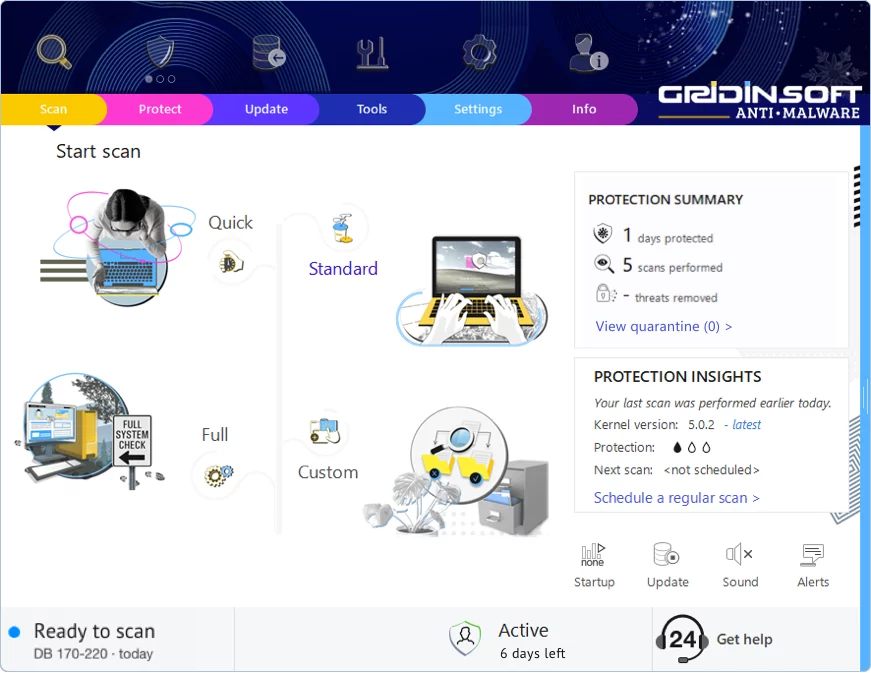
The app launches right after installation. You'll see the main dashboard with the scan button front and center.
-
4
Hit "Standard Scan" — this checks all the spots where malware typically hides: temp folders, browser data, startup programs, and system directories.
-
5
Once the scan finds this threat, click "Clean Now". The removal usually happens instantly, though some stubborn infections may need a reboot.
-
6
If you see a restart prompt, go ahead and reboot. This clears any malware that was running in memory and ensures your system starts fresh.
Leave a Comment

Gridinsoft Anti-Malware
Stay Malware-Free: Keep Your PC Protected with Gridinsoft Anti-Malware
Gridinsoft Anti-Malware offers just that—peace of mind with a robust, user-friendly solution that’s constantly updated to combat the latest threats. Designed by cybersecurity experts, it provides real-time protection and effortless malware removal. It’s not just about detecting threats; it's about enhancing your digital life with uninterrupted security. Give it a try and experience what it feels like to browse worry-free!