
5913.exe Trojan Packed Analysis
Technical Analysis
| File Name | 5913.exe |
| File Type |
PE32 executable (GUI) Intel 80386, for MS Windows, UPX compressed
|
| Scanner Version | 1.0.252.174 |
| Database Version | 2026-08-23 17:00:28 UTC |
Trojan.Win32.Packed.oa!s2
Malware family: Packed
Scan Another File
File Identification
| Hash Type | Value | Action |
|---|---|---|
| MD5 |
bec535c4895c02c260b2f15e207580b9
|
|
| SHA1 |
cb91985d53768430ccfc3078538c468b53f9bf54
|
|
| SHA256 |
11c9d98dc0c47e3371454f9eea070c0e032a00a684c184eb4c25cafc77e757bf
|
|
| SHA512 |
a955abda1c2c059aefafa18a9c79da5d1796fc06196c9348ed7c3a1da01259286ee839a0927b1c6deb88dde1c36b3b635e88d5b08b94ef02edea50d0c007c8bc
|
|
| ImpHash |
c1f9ea6d51ba4934aeaee8b1f7d283d7
|
PE Analysis
Basic Information
▼| Icon |
Hash: dee3141180d834204d53aee360a9701b
Fuzzy: 19b9692b5a56693b5460b871a2c153f4 dHash: 104281f0f43ec620 |
| Image Base | 0x00400000 |
| Entry Point | 0x00426bc0 |
| Compilation Time | 2012-12-31 00:38:51 |
| Checksum | 0x00000000 (Actual: 0x000551c7) |
| OS Version | 4.0 |
| PEiD Signatures |
PE32 executable (GUI) Intel 80386, for MS Windows, UPX compressed
|
| Digital Signature | No valid SignedData structure was found. |
| Imports |
9 libraries
ADVAPI32, COMCTL32, GDI32, KERNEL32, MSVCRT, ole32, OLEAUT32, SHELL32, USER32 |
| Exports | 0 functions |
| Resources | 7 Resources |
| Sections | 3 Sections |
Version Information
▼| Translation | 0x0804 0x04b0 |
| Comments | 方便实用的USB设备主控芯片识别工具 |
| CompanyName | 数码之家 |
| FileDescription | U盘/MP3主控芯片识别工具 |
| LegalCopyright | ~~翁软在线 创意无限~~ |
| LegalTrademarks | 哈尔滨工业大学研究生院 哈尔滨理工大学软件与微电子学院 |
| ProductName | Chip Genius |
| FileVersion | 4.21.0701 |
| ProductVersion | 4.21.0701 |
| InternalName | ChipGenius_v4_21_0701 |
| OriginalFilename | ChipGenius_v4_21_0701.exe |
PE Sections
▼| Name | Virtual Address | Virtual Size | Raw Size | Entropy | Characteristics | MD5 |
|---|---|---|---|---|---|---|
UPX0 |
0x00001000 |
90,112 bytes | 0 bytes | 0.00 (Normal) |
IMAGE_SCN_CNT_UNINITIALIZED_DATA|IMAGE_SCN_MEM_EXECUTE|IMAGE_SCN_MEM_READ|IMAGE_SCN_MEM_WRITE
|
D41D8CD98F00B204E9800998ECF8427E |
UPX1 |
0x00017000 |
65,536 bytes | 65,024 bytes | 7.91 (Packed/Encrypted) |
IMAGE_SCN_CNT_INITIALIZED_DATA|IMAGE_SCN_MEM_EXECUTE|IMAGE_SCN_MEM_READ|IMAGE_SCN_MEM_WRITE
|
EE189212E520B4B90FF0AFD4986FDCAB |
.rsrc |
0x00027000 |
8,192 bytes | 7,168 bytes | 3.70 (Normal) |
IMAGE_SCN_CNT_INITIALIZED_DATA|IMAGE_SCN_MEM_READ|IMAGE_SCN_MEM_WRITE
|
9AF4D747F78F8982BD39F9E5052B1C51 |
Entropy Analysis Alert
1 section(s) with high entropy (≥7.5) detected - possible packing/encryption
Resource Analysis
▼| Resource Type | Count | Total Size | Percentage |
|---|---|---|---|
| RT_ICON | 4 | 5,792 bytes | |
| RT_GROUP_ICON | 1 | 20 bytes | |
| RT_VERSION | 1 | 896 bytes | |
| RT_MANIFEST | 1 | 838 bytes |
Certificate Chain Analysis
▼No Digital Signatures
This file is not digitally signed.
Security Implications:
- Cannot verify the publisher's identity
- Increased security risk when running this file
- May trigger security warnings on some systems
⚠ This file either lacks a digital signature or the certificate chain could not be verified
Exercise caution when executing unsigned files from unknown sources
Certificate Verification Status
No valid SignedData structure was found.
Recommendation: Verify the file source and ensure it comes from a trusted publisher.
Trojan.Win32.Packed.oa!s2 Removal
Gridinsoft has the capability to identify and eliminate Trojan.Win32.Packed.oa!s2 without requiring further user intervention.
Download Anti-MalwareRemoval Instructions
Follow these steps to completely remove the threat from your system
-
1
Get Gridinsoft Anti-Malware — it's a quick 2 MB download that won't slow down your PC.
-
2
Run the installer gsam-en-install.exe. The setup takes about 2 minutes and doesn't require a restart.
-
3
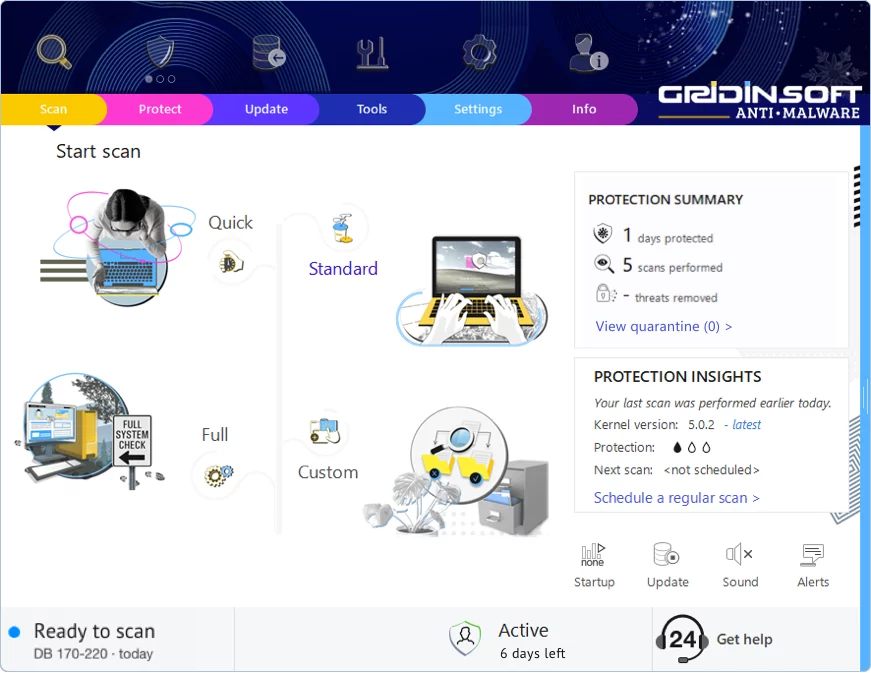
The app launches right after installation. You'll see the main dashboard with the scan button front and center.
-
4
Hit "Standard Scan" — this checks all the spots where malware typically hides: temp folders, browser data, startup programs, and system directories.
-
5
Once the scan finds this threat, click "Clean Now". The removal usually happens instantly, though some stubborn infections may need a reboot.
-
6
If you see a restart prompt, go ahead and reboot. This clears any malware that was running in memory and ensures your system starts fresh.
Leave a Comment

Gridinsoft Anti-Malware
Stay Malware-Free: Keep Your PC Protected with Gridinsoft Anti-Malware
Gridinsoft Anti-Malware offers just that—peace of mind with a robust, user-friendly solution that’s constantly updated to combat the latest threats. Designed by cybersecurity experts, it provides real-time protection and effortless malware removal. It’s not just about detecting threats; it's about enhancing your digital life with uninterrupted security. Give it a try and experience what it feels like to browse worry-free!