Attack-on-Titan-3 Launcher.exe Trojan Agent Analysis
Technical Analysis
| File Name | Attack-on-Titan-3 Launcher.exe |
| File Type |
PE32 executable (GUI) Intel 80386 Mono/.Net assembly, for MS Windows
|
| Scanner Version | 1.0.262.174 |
| Database Version | 2026-11-26 13:07:03 UTC |
Trojan.Win32.Agent.sa
Malware family: Agent
Scan Another File
The uploaded file itself is not retained or shared with third parties. File names, hashes, and analysis results may appear in public reports. For confidential material, contact Support before uploading. How we use your data.
File Identification
| Hash Type | Value | Action |
|---|---|---|
| MD5 |
2c6307e8a4ffef789794029b306bc3c7
|
|
| SHA1 |
28872dc3cc0bab790ad5d494e3a509aa6c62fabf
|
|
| SHA256 |
a75ff80cc8dd09fa54a54342271bd1530e280c03f3c49a0ab7e3d477b522a678
|
|
| SHA512 |
661d0d4681b35f7b763b048757968673622c519306cc2a186f2c1f4c145e5ae2e185ac1dd6bbc7e78084a2bb82550cd4c3bdb2dd7970eb76bc90cdfd35d691c2
|
|
| ImpHash |
f34d5f2d4577ed6d9ceec516c1f5a744
|
PE Analysis
Basic Information
▼| Icon |
Hash: 32218fa9e76923077d35aa2e505fa782
Fuzzy: a64a7a248e2317d3531252ef6db25c87 dHash: 686c74e4c2e8e4e0 |
| Image Base | 0x00400000 |
| Entry Point | 0x004a2dee |
| Compilation Time | 2084-11-23 11:35:13 |
| Checksum | 0x00000000 (Actual: 0x024a8f44) |
| OS Version | 4.0 |
| PEiD Signatures |
PE32 executable (GUI) Intel 80386 Mono/.Net assembly, for MS Windows
|
| PDB Path | H:\Backup Cur y AG 6 del 11\Proyecto Subnautica2\CursorLimitFixer\obj\Release\CursorLimitFixer.pdb |
| Digital Signature | No valid SignedData structure was found. |
| Imports |
1 libraries
mscoree |
| Exports | 0 functions |
| Resources | 4 Resources |
| Sections | 3 Sections |
Version Information
▼| Translation | 0x0000 0x04b0 |
| Comments | Windows Network and Security Infrastructure Component |
| CompanyName | Microsoft Corporation |
| FileDescription | Microsoft Network Security Component |
| FileVersion | 1.0.0.0 |
| InternalName | CursorLimitFixer.exe |
| LegalCopyright | Copyright © Microsoft Corporation. All rights reserved. |
| LegalTrademarks | |
| OriginalFilename | CursorLimitFixer.exe |
| ProductName | Microsoft® Windows® Operating System |
| ProductVersion | 1.0.0.0 |
| Assembly Version | 1.0.0.0 |
PE Sections
▼| Name | Virtual Address | Virtual Size | Raw Size | Entropy | Characteristics | MD5 |
|---|---|---|---|---|---|---|
.text |
0x00002000 |
658,932 bytes | 658,944 bytes | 7.95 (Packed/Encrypted) |
IMAGE_SCN_CNT_CODE|IMAGE_SCN_MEM_EXECUTE|IMAGE_SCN_MEM_READ
|
D41BF980CF9DE6F6D367B5F4304A4519 |
.rsrc |
0x000a4000 |
11,612 bytes | 11,776 bytes | 5.17 (Normal) |
IMAGE_SCN_CNT_INITIALIZED_DATA|IMAGE_SCN_MEM_READ
|
231EAC829DBAB349130C002BE1D7E5CF |
.reloc |
0x000a8000 |
12 bytes | 512 bytes | 0.10 (Normal) |
IMAGE_SCN_CNT_INITIALIZED_DATA|IMAGE_SCN_MEM_DISCARDABLE|IMAGE_SCN_MEM_READ
|
5B5B7DCC40915CAEDCC2CE87BB282376 |
Entropy Analysis Alert
1 section(s) with high entropy (≥7.5) detected - possible packing/encryption
Resource Analysis
▼| Resource Type | Count | Total Size | Percentage |
|---|---|---|---|
| RT_ICON | 1 | 9,640 bytes | |
| RT_GROUP_ICON | 1 | 20 bytes | |
| RT_VERSION | 1 | 1,160 bytes | |
| RT_MANIFEST | 1 | 482 bytes |
Certificate Chain Analysis
▼No Digital Signatures
This file is not digitally signed.
Security Implications:
- Cannot verify the publisher's identity
- Increased security risk when running this file
- May trigger security warnings on some systems
⚠ This file either lacks a digital signature or the certificate chain could not be verified
Exercise caution when executing unsigned files from unknown sources
Certificate Verification Status
No valid SignedData structure was found.
Recommendation: Verify the file source and ensure it comes from a trusted publisher.
Trojan.Win32.Agent.sa Removal
Gridinsoft has the capability to identify and eliminate Trojan.Win32.Agent.sa without requiring further user intervention.
Download Anti-MalwareRemoval Instructions
Follow these steps to completely remove the threat from your system
-
1
Get Gridinsoft Anti-Malware — it's a quick 2 MB download that won't slow down your PC.
-
2
Run the installer gsam-en-install.exe. The setup takes about 2 minutes and doesn't require a restart.
-
3
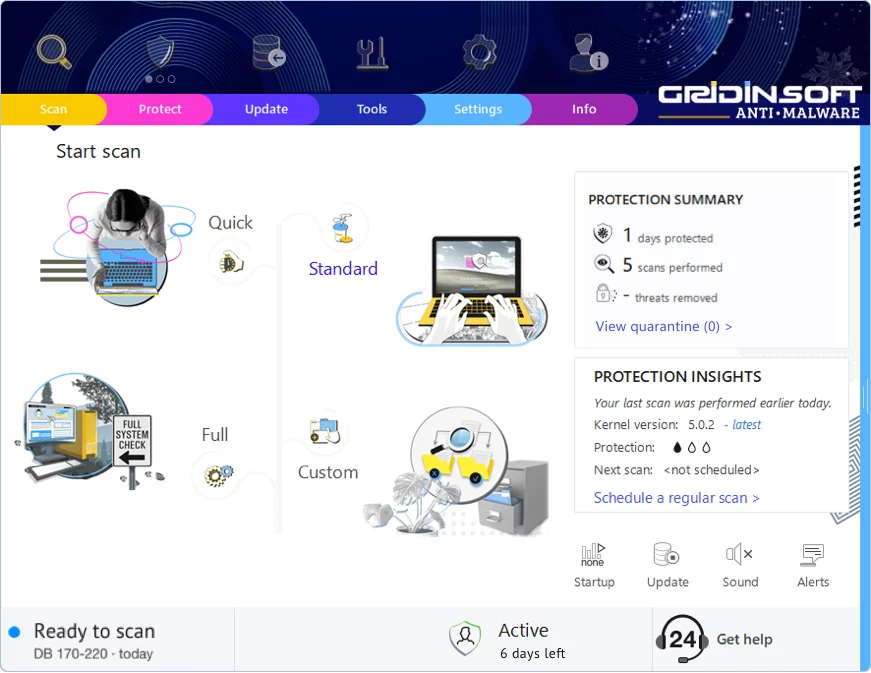
The app launches right after installation. You'll see the main dashboard with the scan button front and center.
-
4
Hit "Standard Scan" — this checks all the spots where malware typically hides: temp folders, browser data, startup programs, and system directories.
-
5
Once the scan finds this threat, click "Clean Now". The removal usually happens instantly, though some stubborn infections may need a reboot.
-
6
If you see a restart prompt, go ahead and reboot. This clears any malware that was running in memory and ensures your system starts fresh.
Leave a Comment
Gridinsoft Anti-Malware
Stay Malware-Free: Keep Your PC Protected with Gridinsoft Anti-Malware
Gridinsoft Anti-Malware offers just that—peace of mind with a robust, user-friendly solution that’s constantly updated to combat the latest threats. Designed by cybersecurity experts, it provides real-time protection and effortless malware removal. It’s not just about detecting threats; it's about enhancing your digital life with uninterrupted security. Give it a try and experience what it feels like to browse worry-free!