Onelink.to Reviews: Phishing, Legit or Safe Check
Gridinsoft Logo

Onelink.to Phishing

December 16, 2025 at 1:09 PM
Phishing
Checked by Website Reputation Checker
Table of Contents
Danger Zone
Risky Territory
Caution Advised
Trusted but Verify
Safe & Secure

Onelink.to → Safety Check

First checked 9 months ago
Phishing
Website content analyzed
Method: automated checks + analyst review.
Reputation footprint:
Limited third-party mentions and inbound links
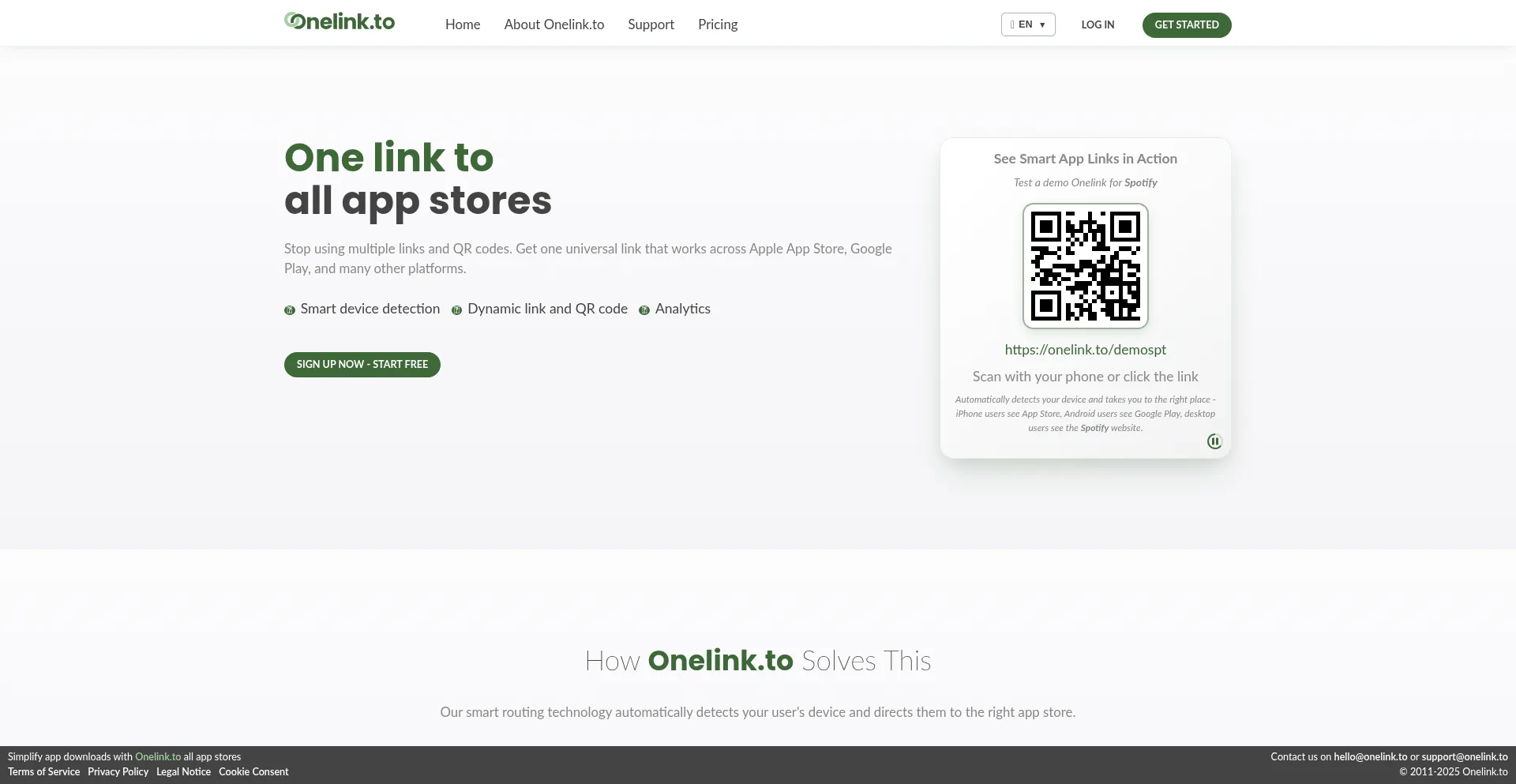
Captured Image: Desktop View as for 2025-12-16 15:09:37

How we scored onelink.to

On-page:
18+, Nonprofit Organization, Cybersecurity, Hosting Provider, Payment Service, Service Provider, Google Tag Manager
SSL Certificate:
Issued by E8 on September 29, 2025. Valid for: 3 months (TLS 1.3)
Positive signals
  • Cookie Consent
  • Multilanguage
  • Long Term Domain
  • Established Domain
Risk indicators
  • Blacklisted
Last checked December 16, 2025 at 1:09 PM by Gridinsoft Trust Model v2.3.1

What is Onelink.to?

Onelink.to operates a phishing platform designed to steal sensitive personal information, such as login credentials and financial data, through social engineering tactics.

The platform uses deceptive techniques, including fraudulent emails, fake websites, and misleading messages, to impersonate trusted entities and trick users into disclosing personal details.

This domain was registered 14 years ago through the company Government of Kingdom of Tonga and owner is unknown. Complaint contact not found.

Is onelink.to safe?

— Unfortunately, not likely.

🚨 Gridinsoft blocks this website because it was classified as phishing.

As of December 16, 2025, Onelink.to has a very low trust score of 22/100 according to our algorithm. Through the security analysis, it has been identified as a potential phishing. Our detection system has found multiple risk indicators, and we recommend avoiding this website.

Why is onelink.to marked "Phishing"?

Gridinsoft evaluates onelink.to, focusing on limited website popularity, suspicious content indicators (Blacklisted), hosting technology and infrastructure, SSL certificate status, website reputation across multiple databases. We weigh these indicators to calculate the trust score.

Onelink.to Digital Footprints

18+
Nonprofit Organization

The domain identifies as a nonprofit organization focused on charitable, educational, social, or humanitarian objectives. Legitimate nonprofit organizations typically provide transparency regarding their mission, activities, and financial operations, though verification of nonprofit status is recommended.

Cybersecurity
Hosting Provider
Payment Service
Service Provider
Cookie Consent

The website implements cookie consent mechanisms in compliance with privacy regulations such as GDPR or CCPA. This demonstrates that onelink.to adheres to data protection standards and provides users with control over personal data collection practices.

Google Tag Manager

The onelink.to website uses Google Tag Manager to add and update tracking tags on its website.

Multilanguage

The website provides multi-language support, demonstrating international accessibility and commitment to diverse user populations. Multi-language implementation typically indicates professional development standards and global operational scope, representing a positive trust indicator.

Long Term Domain

Domain registration extends beyond one year, demonstrating the operator's commitment to sustained operations. Extended registration periods for onelink.to indicate planning for long-term presence and operational continuity.

Established Domain

The domain has maintained active status for an extended period, indicating operational stability and established web presence. This longevity for onelink.to suggests legitimate business operations and sustained user engagement over time.

Blacklisted

Gridinsoft Internet Security classified onelink.to as unsafe.

Color Guide
  • Requires special attention: Indicates areas with potential risks or issues that need careful review.

  • Positive indicators: Highlights trusted elements or reliable features that enhance user confidence.

  • Exercise caution: Signals areas where user data is involved or points that may require additional care.

  • Neutral: Provides information without indicating risk or reliability, serving as general context only.

Security Risk Detected

22 / 100
Phishing
December 16, 2025 at 1:09 PM

Security Advisory: This website poses potential security risks. Please exercise caution when browsing.

Domain Information

Created December 9, 2011 at 12:34 AM
Updated January 13, 2020 at 8:12 PM
Domain Age
14 years
Registrar Government of Kingdom o...
Top Level Domain
.to
Domain Extension
Nameservers ns2.loopia.se
ns1.loopia.se

Technical Details

IP Address 178.128.140.200
Hosting Provider
AS14061 DigitalOcean, LLC
Amsterdam, NL
Available languages
DNS Records 178.128.140.200 A
letsencrypt.org CAA
mailto:[email protected] CAA
ALT3.ASPMX.L.GOOGLE.COM MX
ALT2.ASPMX.L.GOOGLE.COM MX
ASPMX.L.GOOGLE.COM MX
ALT1.ASPMX.L.GOOGLE.COM MX
ALT4.ASPMX.L.GOOGLE.COM MX
ns1.dnsexit.com SOA

Content Analysis

Original website content:

Onelink.to - One link or QR code to App Store and Google Play

Simplify app downloads with onelink.to all app stores. Short link generator and QR codes for app downloads on App Store and Google Play.

Mentioned hosts (6):
fonts.gstatic.com www.google-analytics.com onelink.to fonts.googleapis.com www.googletagmanager.com www.onelink.to

Security Analysis

Detection Signatures:

These signatures are used to generate the security fingerprint below.

18+ Nonprofit Organization Cybersecurity Hosting Provider Payment Service Service Provider Cookie Consent Google Tag Manager Multilanguage Long Term Domain Established Domain Blacklisted
Verified Services:

This domain has been verified by the following legitimate services and organizations, confirming authentic ownership and proper email security configuration.

Google Verification
SPF
v=spf1 include:_spf.google.com -all
Security Fingerprint:

Unique identifier based on site analysis

Phishing operations employ social engineering techniques to deceive users into revealing sensitive information including login credentials, financial data, or personal information through fraudulent communications impersonating trusted entities.
Signs You're Dealing With an Online Scam
Scammers have devised new ways to deceive users, and what was relevant ten years ago may not be applicable today. In this post, we have compiled the most current types of online scams.
Read Now

Warning Summary

This section provides a detailed breakdown of security warnings from multiple trusted sources.

We gather verdicts from a range of security providers to assess the safety of the site. If any of these sources flag the site as potentially harmful, it will be marked with a warning. Each entry includes the source and their findings, allowing you to see the different assessments. This transparency ensures you have all the information needed to evaluate the site's risk.

If no warnings are issued, the site is considered safe based on the analysis from all checked sources. For more details, please review the individual findings below.

CRDF
Malicious
Gridinsoft
Warned
BitDefender
Clean
Google Safebrowsing
Clean
Phishing Database
Clean
Netcraft
Clean
Criminal IP
Clean
OpenPhish
Clean
ESET
Clean
CyRadar
Clean
Sophos
Clean

Onelink.to blocked? Check the safety report created on December 16, 2025

How to block Onelink.to?

Gridinsoft has the capability to block onelink.to domain without requiring further user intervention.

  1. Start by downloading Gridinsoft Anti-Malware to your computer.
  2. Double-click on the gsam-en-install.exe file and follow the on-screen instructions to install the program.
  3. Once the installation of Gridinsoft Anti-Malware is complete, the program will open on the Scan screen.
  4. Click on the "Standard Scan" button.
  5. After the scanning process is finished, click on "Clean Now" to remove any detected threats.
  6. If prompted, restart your system to complete the removal process.

Exclusion

If you wish to visit a blocked "onelink.to" and exclude it from being blocked, you can add it to the exclusions list. Here's how to do it:

  1. Open Gridinsoft Anti-Malware;
  2. Click the Tools tab;
  3. Click the Ignore List;
  4. Click the Internet vertical tab and press "Add...";
  5. Enter "onelink.to" and click Add button.

Now this domain should appear in your Ignore List.

Are You the Owner?

If you own Onelink.to, we'd love to hear from you. If you'd like to challenge the trust score assigned, we're happy to take a closer look. You can write to us legal(at)gridinsoft.com. However, please be prepared to provide proof of your business's legitimacy. Introduce yourself with your real name. Please note, we never charge website owners for reviews or reconsideration requests. For more information, please review our Disclaimer.

Leave a review
Share your thoughts or insights about the "onelink.to" website. Have you encountered any positive or negative experiences with it? Do you align with our conclusion?

* Your feedback could influence our rating, and rest assured, your email will remain confidential and will only be used to communicate with you if necessary.
Your score for onelink.to
22
points /100
The score is based on a 1-100 scale, with 100 being the most reputable.
Check another website
Verify the security of domains and services based on 8.5M+ real websites.
URL Checker: How to block Onelink.to?
Have you had a personal experience with Onelink.to?
Share your thoughts and rate it to help others make informed decisions!