
Gridinsoft Logo

Apply.tc.edu Review: Unverified Social Links

September 18, 2026 at 6:11 PM
Suspicious Website
Checked by Website Reputation Checker
Table of Contents
Danger Zone
Risky Territory
Caution Advised
Trusted but Verify
Safe & Secure

Apply.tc → Safety Check

First checked September 18, 2026 at 6:11 PM
Website content and technical signals analyzed
Method: automated checks.
Suspicious Website Gridinsoft currently classifies this site as Suspicious Website. The report highlights no established public user-review history.
Figure 1. Website screenshot for Apply.tc.edu. 2026-09-18 21:11:38

How we scored apply.tc.edu

Tech signals:
Facebook Integration
Positive signals:
  • strong independent trust
  • an active SSL certificate (3 months)
Negative signals:
  • unclear social-profile authenticity
  • limited independent reputation data
Last checked September 18, 2026 at 6:11 PM by Gridinsoft Trust Model v2.5.4

What is Apply.tc?

According to its current page title, apply.tc.edu presents itself as “Application Management”. The sections below evaluate the site-specific reputation and technical findings.

and ownership information is not publicly available. Complaint contact not found.

Is apply.tc.edu safe?

Use caution with apply.tc.edu. Its current Gridinsoft trust score is 35/100; review the site-specific findings below before use.

Why is apply.tc.edu marked "Suspicious Website"?

Gridinsoft's current assessment of apply.tc.edu is based on unverified social-link signals. Context considered alongside those findings includes limited public traffic history. None of the 25 publicly displayed security sources report a warning.

Apply.tc Digital Footprints

A structured view of the site's detected themes, page signals, and related online footprint elements.

Registration Form

Automated page analysis detected form or data-entry functionality on apply.tc.edu. Forms can involve user-submitted information, so verify ownership and privacy terms before entering data.

Google Tag Manager

This website uses Google Tag Manager to add and update tracking tags on its website.

Facebook Integration
Fake Social Media Links - Risk

apply.tc.edu: Automated analysis found social media icons or links that did not lead to recognizable public profiles. This can result from outdated, incomplete, or template-based content. Check the links directly before relying on them to confirm the site's public presence.

Color Guide
  • Requires special attention Marks high-risk findings that should be reviewed first.
  • Exercise caution Highlights areas involving user data, payments, or permissions.
  • Positive indicators Shows trust signals that support the site's reliability.
  • Neutral General context that does not increase or reduce risk on its own.

Domain Information

Top Level Domain .edu Domain Extension
Subdomain apply
Domain Name Apply.tc.edu
Registration details are private or not accessible for this domain.

Technical Details

HTTP status 302
IP Address 34.198.122.35
Hostname ec2-34-198-122-35.compute-1.amazonaws.com
Hosting Provider AS14618 Amazon.com, Inc. Ashburn, Virginia, US
SSL Certificate YR2 TLS 1.3 · Valid for: 3 months · from September 6, 2026 at 6:08 PM · to December 5, 2026 at 6:08 PM
Name Servers auth2.dns.cogentco.com
ext-ns1.columbia.edu
auth1.dns.cogentco.com

Content Analysis
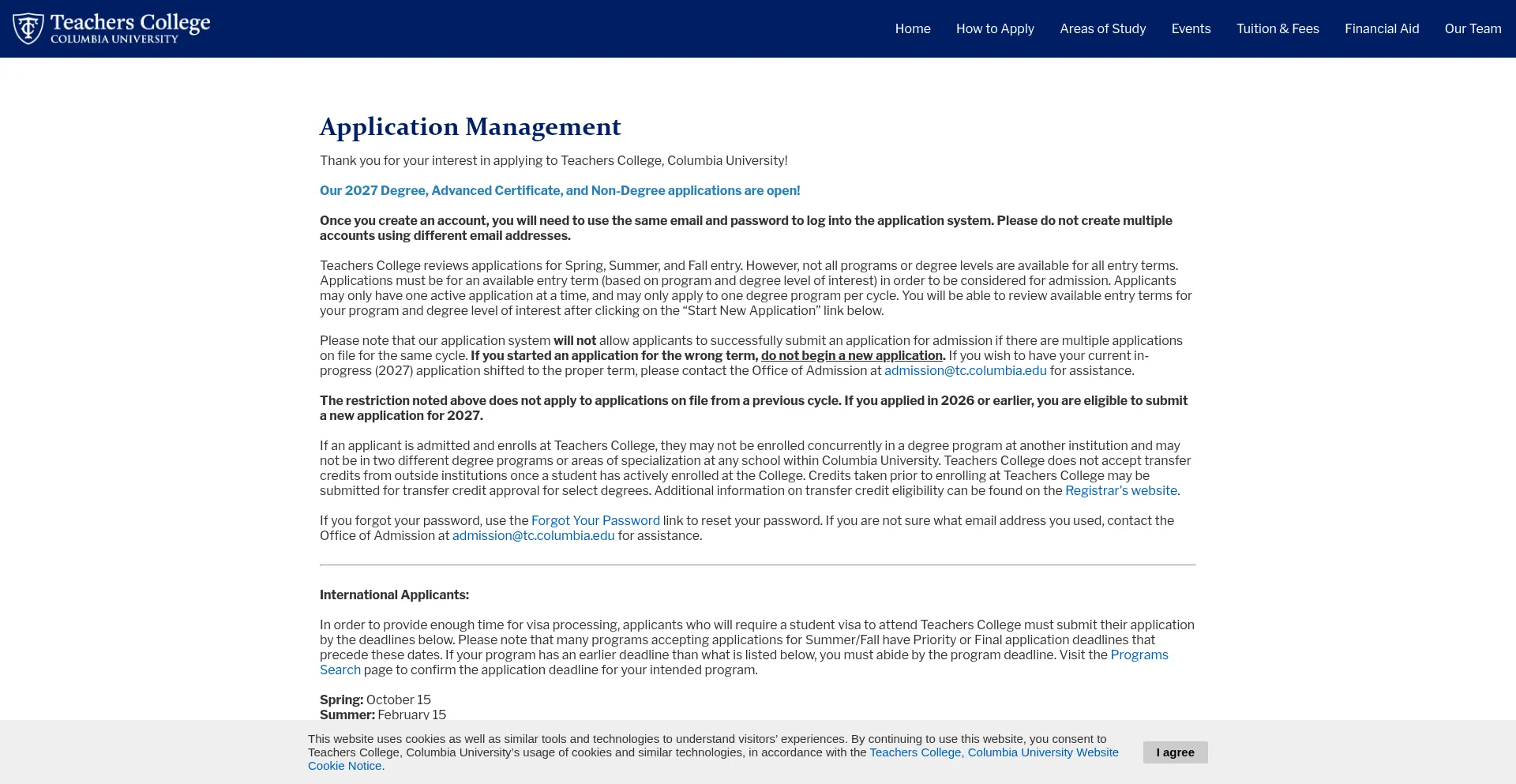
Website title Application Management
Primary Language
Preview
Application Management
Hover to explore
Mentioned hosts (29)
apply.tc.edu analytics.google.com googleads.g.doubleclick.net tccolumbia.navexone.com www.googletagmanager.com stats.g.doubleclick.net twitter.com c.clarity.ms scripts.clarity.ms www.clarity.ms www.google.com www.facebook.com snap.licdn.com slate-technolutions-net.cdn.technolutions.net connect.facebook.net and 14 more

How to block Apply.tc.edu?

Our Anti-Malware can automatically block access to apply.tc.edu if it is flagged as malicious.

  1. Install and run the protection.
  2. The program will block flagged domains and remove related threats.

Exclusion

If you believe apply.tc.edu is safe, you can add it to the exclusion list:

  1. Open Gridinsoft Anti-Malware → Tools → Ignore List.
  2. Go to the Internet tab and add apply.tc.edu.

See detailed instructions for more options.

Are You the Owner?

If you own Apply.tc.edu and want to challenge the trust score, please submit a review request via portal.gridinsoft.com. There you can claim your profile and add verified company/contact details. If you cannot access the portal, email legal(at)gridinsoft.com with proof of legitimacy and contact details. We never charge website owners for reviews or reconsideration requests. For more information, please review our Disclaimer.

Leave a review
Share your real experience with apply.tc.edu. Is it a trustworthy site, or did you encounter any issues? The more detail you provide, the more helpful your review is for others!

Publication Tip

- Your feedback helps us improve our security scores.
- Detailed reviews describing your real-life experience have a much higher chance of being published.
- Your email remains confidential.

Gridinsoft Portal
Signed in via Gridinsoft Portal · View profile
Your score for apply.tc.edu
35
points /100
The score is based on a 1-100 scale, with 100 being the most reputable.
Check another website
Verify the security of domains and services based on 10M+ real websites.
Is This Your Website?
Think your website was scored unfairly? Request a reevaluation and our team will take another look.
Flag for Reevaluation
Have you had a personal experience with Apply.tc.edu?
Share your thoughts and rate it to help others make informed decisions!
Is This Your Website?
Think your website was scored unfairly? Request a reevaluation and our team will take another look.
Flag for Reevaluation
Have you had a personal experience with Apply.tc.edu?
Share your thoughts and rate it to help others make informed decisions!